It’s time for me to be honest. For years my Customer Follow-Up Workflows included sticky notes, calendar notifications, and promises. One day, a client reached out to me on Monday, I planned to respond on Tuesday but forgot about it by Friday. Every owner of a business has such an experience.
The hardest thing about it is that follow-up is where sales happen or fail. Customers never say no. They simply fall silent because no one got back to them when needed. That’s why I began to pay attention to how to create a workflow of customer follow-ups using AI assistants and believe that it’s one of the most realistic uses of automation.
In this article, I will show you what it means, how it works, and what steps you should take to implement it.

How Follow-Up Breaks Down in the Majority of Companies
Before we discuss the solutions, here is the reality behind the problem. The reason why follow-ups break down tends to be mundane:
- Their team is busy and follow-up is always the activity they postpone to tomorrow.
- It has no owner, so everyone assumes that some other person must have already sent the message.
- The information is dispersed across emails, chats, spreadsheets and people’s minds.
- The messages are not personalized and, hence, go unread.
This isn’t a people problem; this is a system problem. A person cannot possibly remember to message their forty customers at just the right time; a properly set up system can.
What Exactly Is an AI Assistant for Customer Follow-Up Workflows?
Let’s keep it simple. A basic automation will send the same email three days from the time the customer has registered. The AI assistant does better than that.
It understands the context of the actual customer comment; understands how to proceed, writes an email which feels personal because it was written for him. Moreover, it also sees whether the customer is responding, answers simple questions, arranges the call and passes the complex issues to a human along with all the conversation. So, the AI is not just a timer but much more like an efficient team player.
Custom Workflow Automation: Why “One-Size-Fits-All” Approach Fails
And here is a lesson that has been hard-earned by me. Follow-up templates designed ready-to-use do not always match any real business.
For example, follow-ups for a dentist’s clinic would differ from follow-ups for a software provider and, say, a carpentry shop – as well as the time of following up, the questions asked and even the tone used. This is why a custom workflow automation plays such an important role. Not the other way round, when a company changes its processes to adapt to some tool.
In a custom system, you determine:
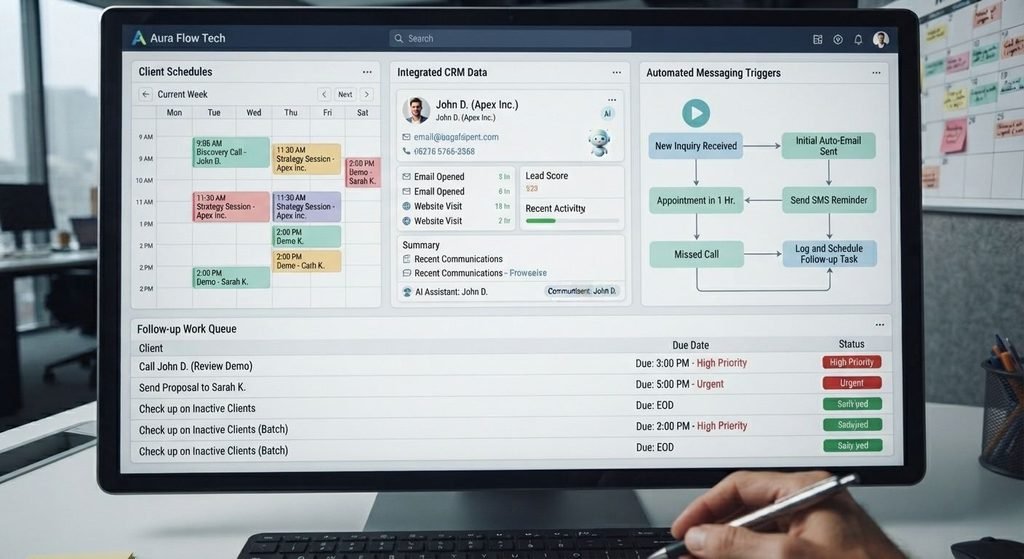
- Triggers of the follow-up: a new enquiry, an abandoned quotation, a missed appointment, a delivered order or an inactive client;
- The timing of sending the follow-up: within minutes for the most promising leads and a bit later for the less urgent ones;
- The channel via which it is sent: by email, SMS, WhatsApp or via a phone call;
- The content of the message: based on the history of communications with a particular client.
- When a human intervenes. Complaints, large transactions, and delicate issues should be handled by a human at all times.
That point is particularly important because the best systems know their limitations.
AI for Customer Service Workflow Automation
The follow-up is not all about the sales process. In fact, a significant part of it is the after-sales services and here AI for customer service workflow automation proves its value.
Imagine the process of the customer contacting the support. There is someone who will have to confirm that the problem has been fixed, send required documents, receive feedback from the client and check up on him if he has not answered. All this can be done by an AI assistant:
- The assistant will acknowledge the request immediately.
- It will collect all the information necessary to solve the problem.
- The case will be sent to the appropriate employee along with a brief summary.
- The assistant will check up on the result after the problem solving.
- When the time is right, the assistant will ask for feedback.
Here’s How to Implement This in 8 Simple Steps
Here is how exactly I would implement it for myself if needed in the company I run today.
Step 1: Draw your actual follow-up process. What really happens when someone expresses interest in your company or makes a purchase? List all the steps. You’ll see some leaks right away.
Step 2: Select one important interaction. Do not automate all the interactions – select just one most valuable for the time being. It may be anything from dealing with inquiries to follow-ups after abandoned quotes.
Step 3: Improve your customer database. The AI tool can do wonders only with good data available. Collect all the information about your clients in one place, correct it and organize.
Step 4: Define rules. Create easy-to-follow rules for your virtual assistant: which clients will be contacted, at what times, via what channels, and what actions it should never take under any circumstances.
Step 5: Inject your personality into it. Show some actual emails and messages you have sent before. The assistant needs to mirror your company and not be just a robotic voice that reads out lines.
Step 6: Integrate your services. Your CRM, calendar, inbox and messaging service need to be connected to the assistant so that it acts rather than offers recommendations.
Step 7: Run trials. Start the trials with a few clients and monitor each message sent in the first couple of weeks.
Step 8: Evaluate and refine. Measure response rates, booking rate and customer feedback and make improvements where necessary.
Some Practical Examples
It might be useful to consider some practical examples.
Service company. Customer asks for a price, but does not react. Assistant waits for two days and writes them a polite question concerning that specific service they requested, offering to make a call. No answer? Writes to them once again after a week and stops all the efforts. No spam, no awkwardness.
Online shop. Customer got their order. Some days later, assistant makes sure if everything is alright, provides useful instructions and suggests a related item if necessary. If there are any problems, it alerts the human instantly.
Clinic/appointment company. Assistant schedules appointments, reminds people of them and contacts those who do not attend with an opportunity to book another time. No-shows happen very rarely now, and the reception area gets a serene atmosphere.
European Market Considerations
If you are operating in or selling to the European market, there is additional considerations that you need to take into account, and I would prefer you knew it sooner rather than later.
Privacy concerns the European consumer, and regulations on personal data (GDPR), are taken very seriously. This has implications for how you store your customer data, how you seek consent for communications and data deletions. There are also laws in Europe governing the use of AI, which includes a certain amount of disclosure when it comes to automated communication. Language is important as well, as follow-up communications that sound natural in German should be written in German.
That’s why businesses that research leading companies providing custom AI automation workflow optimization in Europe are not just interested in having advanced technology. They seek for partners who will have an understanding of compliance, several languages, and local customers’ demands. If you are comparing different providers, do not hesitate to ask them about consent, data storage, and transparency. Also, before you start using the service, it may be useful to check your configuration with a lawyer.
Mistakes to Avoid
Here’s what I see trip people up:
- Becoming too pushy. More emails mean nothing. Set realistic limits.
- Concealing the fact that the communication is automatic. Honesty earns respect. Be open about it if the customer asks.
- Not having a human option available. Make sure there is always a way for your customers to contact a human.
- Taking data from unreliable sources. Spelling mistakes and out-of-date information may make your AI look incompetent.
- Failing to monitor the process. Go over the communication regularly and optimize it.
- Sending emails to those who didn’t agree to get them. This isn’t right anyway.
What Results to Expect?
Try to be reasonable here. What I see as a realistic result is faster responses, better retention of leads, less stressed staff, and improved customer experience. Some companies may even have better reviews and more orders because their customers feel remembered. It won’t improve a bad product but it will guarantee that all the hard work you do gets done.

Final Thoughts
When it comes to mastering how to use AI assistants for customer follow-up automation, it is important not to see it as replacing the human element of interaction but ensuring that the human element always gets done in the right way.
All I recommend is choosing one moment of follow-up, writing down how it works right now, and finding out what part of it can be automated.
If you are interested in workflow design and development for your specific case, you are more than welcome to visit our site at Aura Flow Tech.