In most tutorials on construction management software, there is usually a list of features: scheduling, budgeting, documentation, and reporting. While such lists can be helpful when trying to find out which software to purchase, they do not help in answering the question that you really need an answer to: will this software make my next project easier to manage or just another space for typing things down?
Therefore, let us try something else. Let us follow a fictional project through its stages starting from the initial estimate to the final photo of the completed project.
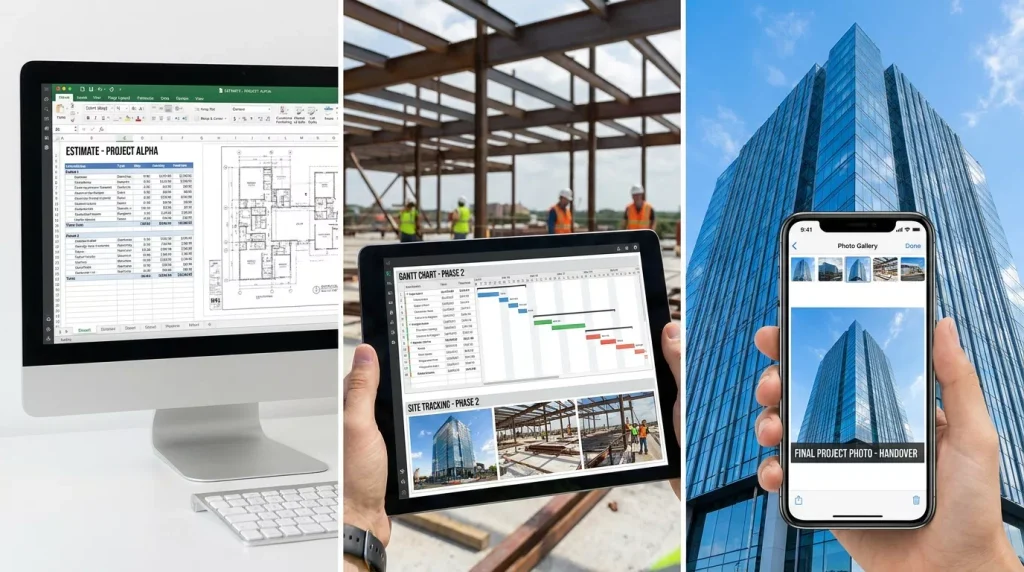
Moment One: The Estimate
The homeowner makes a call. You go, measure, sketch and then return home to price it. If not using software, you need a notebook, a calculator and a spreadsheet that isn’t quite the same as before.
Where software helps: Software ensures that your cost list, labor rates and markups are stored in one place so two estimates of similar work aren’t unintentionally priced differently. Software that allows you to make a bid from your own pricing, provides you with a quality proposal and tracks your wins is excellent software.
Where it doesn’t help: When you have to re-create your entire pricing from scratch or the proposal it creates looks nothing like what your company is all about.
Moment Two: The Contract and Scope
The homeowner says yes. Time to write out the scope: what’s in the deal, what’s not, and who gets to decide when stuff changes?
Where it works: All the contracts, all the drawings, all the specs stick around where the work is getting done, rather than hidden away in someone’s e-mail inbox.
Where it fails: Disorganized document folders. When the most recent drawing is in three different places, the problem has only been magnified by technology.
Moment Three: Scheduling the work
Excavate first. Pave second. Irrigate third. But all of this is conditional upon the weather, material delivery and the one subcontractor who is fully booked out.
What works here: A common schedule that reflects the following steps, people involved and any bottlenecks that may emerge.
What doesn’t work here: Overcomplicated scheduling that requires a specialist to keep it updated. An unkept schedule is better off not being kept at all as it misleads.
Moment Four: Materials and Subcontractors
Pavers, soil, vegetation, pipes and fittings and a crane or bobcat rental for a day. Each of them comes with lead times and suppliers. In particular, vegetation cannot afford any delays.
What works here: Purchase orders based on the project, delivery schedules and subcontractor information all in one document.
What doesn’t work here: A situation when order and scheduling are separated into different systems and need to be repeatedly retyped.
Moment Five: Working on the Site
This is where the work really gets done – with mud, bad weather, and surprises. Someone discovers an old drain line. Delivery is late by a day. Rain makes work impossible.
Where it works: A mobile application with daily logs, stamped photographs, quick notes, and punch lists. When the client asks, “Why did that take longer?” you can show him.
Where it fails: Any logging system that takes more than a minute or two will be ignored. User friendliness on a phone, while wearing gloves, and with bad lighting is far more important than any report.
Moment Six: Change Requests
The homeowner wants his patio larger. You find rock instead of the soil required. Changes are expected. Unpriced and undocumented changes equal loss of profit.
Where it works: A simple change order process – define the change, price it, receive approvals, and revise the budget and schedule. Everyone knows what has been approved.
Where it fails: Overly complicated approval processes that make people bypass them and verbally agree on changes.
Moment Seven: Billing
The deposit, interim billing and final invoice. Cash flow management in construction is reliant upon accurate and timely billing.
What works: Progressive invoices based on actual progress, linked to budget and cleanly transferred to your accounting program, so there’s no keying-in of totals.
What goes wrong: Software that doesn’t integrate with your accounting package. If you export the data weekly and reimport it, then the integration happens between you.
Moment Eight: Closeout and Beyond
Photographs, punch list, warranty information, maintenance notes and the absolutely critical handover to the client.
What works: One location for everything to do with the project. This is helpful when six months later the client calls you because a plant died or the paver was not installed correctly.
What goes wrong: Inconsistent close-out of projects that leave your documentation incomplete. The practice is every bit as important as the software.
How Does It Change for Landscape Work
Landscape construction management software comes with some special considerations you don’t see when you are evaluating other products.
- Seasonality. Planting seasons, weather and site conditions determine the timing.
- Living materials. Availability, size, substitute material, and warranty issues apply to plants.
- Metric by area and volume. Mulch, soil, gravel and turf are measured by square or cubic feet, not units.
- Many small contractors. Subcontractors usually deal with such areas as irrigation, lighting, masonry, drainage and carpentry.
- Post-install maintenance. Many projects result in maintenance contracts, so it’s necessary that your tool helps with this too.
While trying the software, insist on a demonstration of a landscape project – plant list, irrigation line and an estimation by area. If they show you only how they work with a house building project, make sure they can adjust it to fit a landscaping task.
How “Cloud” Really Helps You
Cloud-based construction management software is basically run through the server of the software vendor and can be accessed via an app or browser. This normally means accessibility in the office, at home, or at a worksite, shared information that is updated in real time, as well as backup and updates.
These trade-offs should be understood. You will need an internet connection and should find out how the app works in case there is no good connection, how you can work offline and synchronize later, how the subscription model works, and if you can export all of the information if you decide to go away.
Considerations for a Small Business
For a construction management software package for small business, don’t choose an enterprise suite downsized. I would look for five things:
- Designed for mobile phones. Without user acceptance by the crew, nothing else matters.
- Time to implement. Any construction management software tool taking months to set up is not for a small business.
- Clear pricing. Be aware whether you pay based on number of users, projects or flat fee. Also be aware about any costs of onboarding.
- Integration with accounting system. It must work with the software suite you use.
- Scalability. Don’t have to change the tool when hiring your fifth employee.
Test a Real Job During the Free Trial
Do not do a trial for a made-up job. Choose one small job and test its workflow from estimation to invoicing through the free trial. Within a few weeks you will know if the crew accepts the tool, if invoices flow and how responsive vendor support is. A free trial for a fake job means almost nothing.
FAQs
What is construction management software?
Construction management software is software that helps manage construction work such as estimation, planning, documentation, budgeting, scheduling, communicating, change orders and invoicing usually within a single software application.
Is cloud-based software better than installed software?
For most small to mid-sized contractors, cloud-based software is the way to go as it allows easy accessibility across multiple platforms as well as automatic updates. One needs to be aware of its reliance on connectivity.
Do I really need it if I only have three or four employees?
No necessarily. You can do without construction management software if you don’t waste too much time on retyping, missing changes and chasing documents. If your projects are simple enough you might not need everything.
How much does it cost?
Costs vary significantly from project to project as well as from contractor to contractor and also constantly change. There are many different subscription models: per user, per project or just once.
Will it function with low signal at site?
Depends on the product. Enquire about offline mode capabilities, what is possible to do off the connection and how will the process of synchronization be performed after that.
Is it secure and am I able to carry my data along with me?
Ask about the company’s security measures and user permissions. Moreover, inquire into the way of exporting the data and in which form.
How much time does it take to start using the tool?
It depends on a small business with a simple configuration and may take a few days or even a couple of weeks. Estimate the time for training and transferring price lists and templates.
Is it possible to connect with my accounting tool?
Most companies provide integrations, however, there may be differences. Clarify the exact name of the accounting software and what information will be synchronized.
Final Thoughts
The best construction project management software will be the software your team uses and your office trusts. Take a single job and examine the eight stages. Ask what the pros and cons of using the different software options are at each stage, and pick the software that cuts out re-typing without adding unnecessary ceremony. In the case of landscaping, ensure the demonstration includes examples of the type of work that you do.
My recommendation would be to take some time before even considering software and write down three areas in your recent projects where information got lost. Those will be your real requirements.
In case you are interested in automation of administrative tasks connected to construction jobs (quotes, follow-up emails, reminders, reporting), I’d suggest to have a look at our services at Aura Flow Tech.